






Boost Kitchen Efficiency.
Delight Every Customer.

Devourin Group 1171276215

Kitchen Display System for Restaurants

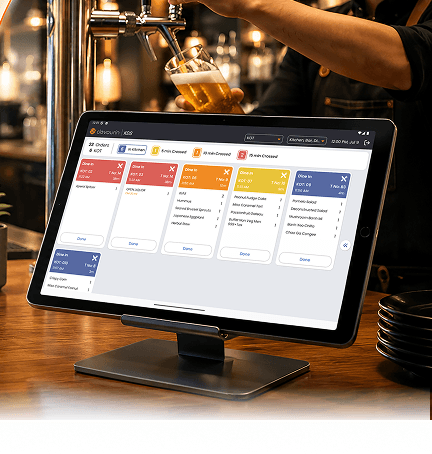
Devourin’s KDS replaces paper tickets with a live kitchen screen. Orders route to the right station, timers keep every dish on track and everything syncs with your POS. It runs on web and app and keeps working even when the internet drops.

Devourin kds hero mobile
Devourin happy customers

Loved By 25,000+ Businesses Worldwide

From restaurants and cafes to cloud kitchens and food chains,
Devoruin is trusted by businesses of all sizes.

What is and how it works

What is a kitchen display system

Devourin orange line

A kitchen display system, or KDS, is a digital screen that shows incoming orders in the kitchen in place of printed tickets. Orders arrive from your POS in real time, each item is timed, and the right station sees only the dishes it needs to prepare.

Devourin’s KDS runs on both web and an app, works offline and updates your POS and Captain app automatically. Here is how it works

Devourin down arrow

1. Receive

Every order placed on the POS or Captain app lands on the kitchen screen straight away, KOT wise and table wise.

Devourin route 1

2. Route

Each KOT type such as desserts, tandoor or continental shows only to the station that cooks it or on one shared screen if you prefer.

Devourin clock

3. Track

Colour-coded timers show how long each order has been open, so the team keeps to time and nothing is forgotten.

Key Features

Devourin orange line
Devourin kds keyfeature icn1

Live Kitchen Dashboard

See how many items and how many active KOTs are running at a glance. A quick status view shows orders from the last hour, with delivered and pending orders in separate tabs. The time window is customizable.

Devourin kds keyfeature icn4

KOT-Wise And Table-Wise Display

Every order and update flows automatically into the POS and the Captain app in real time. There is no double entry, and everyone stays on the same page.

Devourin kds keyfeature icn2

Colour-Coded Timers

Every order carries a colour-coded timer that you can set to your own thresholds such as 5, 10 or 15 minutes. The team sees at a glance which orders are fresh and which need attention.

Devourin kds keyfeature icn5

Web Based And App Based

Run the KDS on a web screen, on the app, or both. You are not locked into fixed hardware, so you can set it up on the devices you already have.

Devourin kds keyfeature icn3

Department-Wise KOT Routing

Different KOT types like desserts, tandoor and continental can be sent to their own kitchen station, so each team sees only its own orders. You can also keep everything on a single screen if that suits your kitchen better.

Devourin kds keyfeature icn6

Works Offline

The kitchen does not stop when the internet does. Devourin’s KDS keeps running offline and syncs again once the connection returns.

Paper Tickets Vs Basic KDS Vs Devourin

Devourin orange line
What Matters Paper KOTs Basic KDS Devourin KDS
Order Display Printed Slips Single Screen
A descriptive summary of the image KOT wise and table wise
Station Routing Sorted By Hand Limited
A descriptive summary of the image Each KOT routed to its own station
Timers None Basic
A descriptive summary of the image Colour coded and customizable
POS And Captain Sync Manual Partial
A descriptive summary of the image Automatic and real time
Runs Without Internet Not Applicable Often Fails
A descriptive summary of the image Works offline
Platform Not Applicable Fixed Hardware
A descriptive summary of the image Web and app based
Recent Order View None Basic
A descriptive summary of the image Delivered and pending tabs, last hour

KDS Built for every kind of kitchen

Devourin white line
Devourin qsr

QSRs: Keep fast-moving orders on time across busy counters

Devourin fine dine

Fine-dine: Coordinate courses across stations without confusion​

Devourin cloud

Cloud kitchens: Run several brands and delivery orders on one screen

Devourin bars cafes

Bars and cafes: keep drinks and food in sync

Devourin multi outlet

Multi-outlet groups: Give every kitchen the same clear, timed view

Frequently Asked Questions

Everything you need to know about Devourin Restaurant Management Software.

What is a kitchen display system?

A kitchen display system is a screen that shows orders in the kitchen in place of paper tickets. Orders come from the POS in real time, each is timed, and the right station sees only what it needs to cook. Devourin’s KDS also runs offline and on both web and app.

The best KDS fits your kitchen and your POS. Devourin suits restaurants that want KOT routing by station, colour-coded timers, automatic POS and Captain sync, and a system that runs on web and app and keeps working offline.

Yes. Devourin’s KDS keeps displaying and timing orders offline and syncs again once the connection returns, so the kitchen never stops.

Yes. KOT types such as desserts, tandoor and continental can each route to their own station, so every team sees only its own orders. You can also keep everything on one screen.

Yes. Every order and update flows automatically into the POS and the Captain app in real time, with no double entry.

Both. You can use Devourin’s KDS on a web screen, on the app, or across both, on the devices you already have.

Yes. Colour-coded timers show the age of each order against thresholds you set, and a last-hour view separates delivered and pending orders.

devourin_white logo
Streamline your restaurant operations with our comprehensive suite of tech-forward hospitality tools designed for clarity and speed.
Quick Links
  • Restaurant POS
  • Restaurant Billing Software
  • Restaurant Billing System
  • Restaurant Inventory Management
  • Restaurant Recipe Management
  • Kitchen Display Screen KDS
Quick Links
  • Link Based Feedback Collection System
  • Owners Dashboard App
  • Restaurant Digital Menu
  • Restaurant Online Ordering System
  • Restaurant Digital Signage
  • Restaurant Point of Sale

Copyright © 2026 Innobliss Solutions Private Limited


Request Demo

WhatsApp